One of the quieter but more important realizations over the last year has been how much platform lifecycle expectations have changed.
Azure Local 23H2 approaching end of support in April 2026 is a good example of that shift. On the surface, it is simply a lifecycle milestone. In practice, it says a great deal about the pace of modern platform operations and the kind of discipline that pace now requires.
This one landed closer to home than a lot of technical announcements do.
The deprecation of the Polyglot Notebooks extension in VS Code was not just a tooling update in the abstract. It disrupted a workflow I had actually come to rely on. That made it more than interesting news. It made it a practical problem.
There is a particular kind of frustration that comes with losing a tool that had quietly become part of how you think. Not just part of how you type, but part of how you explore ideas, test assumptions, document behavior, and move from experiment to understanding.
Looking back on 2025, I ended up using a lot of different tools.
That is not unusual anymore. The toolchain around cloud, hybrid infrastructure, automation, and operations is broader than it used to be. There is more direct API work, more CLI usage, more declarative infrastructure, more Python in certain corners, and more AI-assisted help showing up across the workflow.
And yet, when I look honestly at the work I actually did, PowerShell is still the tool I reached for first more often than anything else.
A few weeks after Ignite 2025, the event energy starts to cool off, and that is usually when the more useful questions begin.
During the event itself, the pace is too fast to process everything well. New features, product updates, big-picture messaging, and polished demos all arrive in a flood. It is easy to come away with a strong sense of momentum, but momentum is not the same thing as clarity.
Ignite 2025 felt different to me, and not because of one giant announcement.
What made it feel different was the consistency of the message across sessions, demos, and follow-up discussion. The overall direction seemed clear: systems are moving beyond simple task execution and toward more active participation in how work gets done.
That is a subtle shift in wording, but it represents a bigger shift in operating models. For years, automation has largely meant defining a process, triggering it, and collecting the result. What showed up at Ignite felt more like a move toward systems that interpret context, suggest actions, generate workflows, and increasingly behave like participants in the loop rather than passive tools.
There is a lot of industry attention on cloud-native everything, AI everything, and whatever the newest operational abstraction happens to be.
Meanwhile, in a large number of real environments, Hyper-V is still doing a huge amount of important work.
That is one reason I wanted to spend a little more time thinking about Windows Server 2025 and Hyper-V together. Neither one dominates the loudest conversations in the way some newer technologies do, but both still matter deeply in the kind of infrastructure that actually runs businesses.
Every now and then, a platform change comes along that forces you to confront habits you have been carrying for longer than you should have.
The Azure PowerShell MFA change was one of those moments for me.
It was not the kind of thing you can politely note and then postpone thinking about forever. It surfaced the places where older automation assumptions had been left in place because they were convenient and familiar. Once those assumptions met a more modern identity model, the cracks were suddenly much easier to see.
I have spent a lot of time over the years working with Azure Automation, and one of the recurring sources of friction has always been runtime alignment.
That sounds like a small technical detail, but anyone who has spent real time building and maintaining runbooks knows it is not small at all. If your local development environment moves forward while your automation runtime lags behind, the whole experience gets more awkward than it should be. You test one way, deploy another, and then spend too much time figuring out whether the problem is your code or the execution environment.
Cloud Shell is one of those tools I do not think about much until I really need it.
That might sound like faint praise, but for infrastructure tooling it is often the opposite. The best tools tend to fade into the background until the exact moment you need them, and then they work with just enough predictability that you can get on with the actual job.
Over the last few months, I started noticing that Cloud Shell had been improving in ways that were not especially flashy, but absolutely showed up in daily use. None of it felt like major headline material. All of it felt useful.
A few weeks after Build 2025, the event energy starts to cool down, and that is usually when the most useful reflection begins.
That post-event window matters to me because it creates enough distance to sort excitement from lasting value. During Build itself, everything arrives at once. The message is fast, the demos are polished, and the future always looks clean. A little later, the better questions start to emerge. What is actually going to change the way I work? Which ideas hold up outside the keynote frame? What survives contact with real environments?
I spent a fair amount of time after Build 2025 going back through announcements, demos, follow-up commentary, and the broader reaction across the technical community, and one thing became very clear to me: AI is no longer being positioned as a side feature. It is being treated as part of the expected workflow.
That shift matters more than the headlines by themselves.
For a while, AI in technical tooling felt like something extra. Interesting, sometimes helpful, occasionally impressive, but still separate from the default path of getting work done. Build 2025 felt different. The framing was much closer to, “This is how work is starting to happen now,” especially across development, automation, infrastructure definition, and operational assistance.
After a few weeks of Summit conversations, follow-up reading, and customer discussions, I found myself rethinking how I describe hybrid infrastructure.
For a long time, it was easy to talk about hybrid as a transition state. It was the thing between the old model and the new model. It was the bridge from where organizations had been to where they were assumed to be heading.
Coming out of the PowerShell + DevOps Global Summit 2025, I kept circling back to a simple thought: most automation looks great in a demo, but far less of it survives production unchanged.
That is not a complaint about demos. Demos are useful. They help people understand what is possible. But real environments do not behave like demos. Authentication changes under you. APIs return something slightly different than expected. Dependencies drift. The script that looked clean in testing becomes awkward six months later when someone else has to maintain it.
I came back from MVP Summit 2025 with the same feeling I usually have after the best technical events: the official sessions mattered, but the real value showed up in the conversations around them.
The hallway discussions, the quick chats after a session, and the moments where someone says, “here is what we are really seeing,” are usually the parts that stay with me the longest. That is where the pattern becomes easier to see. It is also where marketing language tends to fall away and practical direction becomes clearer.
Migrating to Cloud and Running Hybrid: Part 5 - Azure & AVS
For our final technical post in the series, we will look at Microsoft Azure as the public cloud to target for migrating workloads. Similar to our previous post, we will look at some of the options that customers have available to them for migrating on-prem workloads to Azure - we will mention AVS later in the post, but that one is almost cheating.
Migrating to Cloud and Running Hybrid: Part 4 - AWS
For our second technical post in the series, we will look at Amazon Web Services (AWS) as the public cloud to target for migrating workloads. We are going to look at some of the options that customers have available to them for migrating on-prem workloads to AWS. We already have our data handled through the methods we discussed in the last blog post, so now we are talking about getting the workloads themselves up to the cloud.
Migrating to Cloud and Running Hybrid: Part 3 - Guest OS & Replication
If the environment that is being moved to a new platform is not VMware-based, or if vVols are not an option for some reason, then we move to the next layer down and look at performing data migrations from within an operating system. This is performed by enabling and configuring iSCSI within Windows or Linux, creating a host object in the FlashArray with the IQN initiator for the iSCSI initiator, and then mapping a volume to this new host object on the FlashArray. Once the device is visible within the operating system, the raw device should be formatted with the appropriate file system option for the intended usage, and this newly formatted device can then be used for data migration. At this point, we need to discuss a few options and considerations which will be different for Windows versus Linux operating systems. Always have proper planning and backups in place prior to data conversions or migrations.
Migrating to Cloud and Running Hybrid: Part 2 - vVols
Continuing directly from our last blog post, let’s jump in if we need to get to a lower level than VM disks within a hypervisor.
For our second post in the series, we will look at some of the core functionality of Pure Storage which will be used to help any customer migrate workloads, and I am talking about volume management and replication. For many customers that are considering moving VMware workloads to any new platform, one of the easiest ways to be successful with a replatform for any workloads is to separate the data that needs to move platforms from the core operating system.
Migrating to Cloud and Running Hybrid: Part 1 - Why Hybrid Matters
These days, businesses are realizing that sticking to just one cloud or one type of environment does not cut it anymore. The reality is, most organizations need the flexibility to run workloads wherever it makes the most sense - whether that is in their own on-premises setup, in the cloud, or a mix of both.
A hybrid approach can be a game-changer, letting companies keep critical data or legacy systems on-prem while still taking advantage of the scalability and innovation that public cloud platforms offer. But it does not stop there. As things change - whether it is costs, technical needs, or capacity - workloads often need to shift between clouds.
For this next example, we will look at a request which came into from a customer looking to see if there is a way to list the volumes in a protection group snapshot.
We’ll look at how we can produce this output with 2 different methods:
Continue with our use of PureStoragePowerShellSDK (the original v1 SDK) and the ‘New-PfaCLICommand’ cmdlet
Look at the use of PureStoragePowerShellSDK2 to gather these details
While the command that we will use to gather these results from our FlashArray are different, method 1 is the same as our previous blog posts on the process of wrapping CLI commands into PowerShell to work with the results with the addition of using Out-GridView for the selection of a specific Protection Group (pgroup) snapshot.
In our third post in our series, we’re going to take the code that we produced previously to gather additional information for the request of a detailed host mapping that can give a comparison of pre and post upgrade to verify that all of the paths match. In the code from our previous post, we were able to gather the information he needed about the connected initiators from the array perspective. Now, we need to gather the information about our hosts and their registered initiators, then tie that information together.
Now for step 2 in our blog series, we’ll take a look at the CLI output which will give us the details that we are looking for, so we can work towards our “grouped by host” requirement.
The CLI command which will give us the results we are looking for is pureport list with the “initiator” parameter, and a basic run of this CLI command in an SSH session gives us this output:
After a decently long hiatus from writing anything in a series-fashion, I’m back to share a blog series based around automating your Pure Storage environment. We’re going to begin this series with a few posts about advancing both your understanding of your Pure Storage environment and understanding the options available to you for automating and monitoring the infrastructure.
This series will begin with some requests that came from Pure Storage customers, and other Pure employees that asked for some help in delivering the solution, or just some help with understanding how to accomplish the goal. These are normally the most enjoyable tasks to automate, as it gives a chance to understand what sorts of tasks a customer is trying to accomplish and what needs they have, and to help educate others along the way.
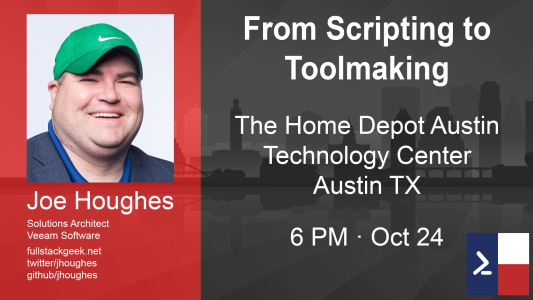
About a month after my presentation of my “From Scripting to Toolmaking: Taking the Next Step With Powershell” session presented at SpiceWorld 2019, I presented the same topic to the Austin PowerShell User Group.
Having a longer period of time to give my presentation led to me being a little bit less rushed, and gave me some time to demo some advanced methods for better performance with PowerShell.
The leaders of the NY/NJ VMUG chapters selected me to present to their usercon in September 2019, for a session titled “Being Effective at Technical Communication - Technology Not Required”.
This session is meant to help IT Pros more effectively deliver their presentations and messages, both within their current organizations, and throughout their careers.
Many of us focus too much on the technology which is part of our roles, and we do not give enough attention to developing soft skills such as effective communications. In practice, being effective at communicating means that you must know how to best deliver your message, in a manner that your audience can understand.
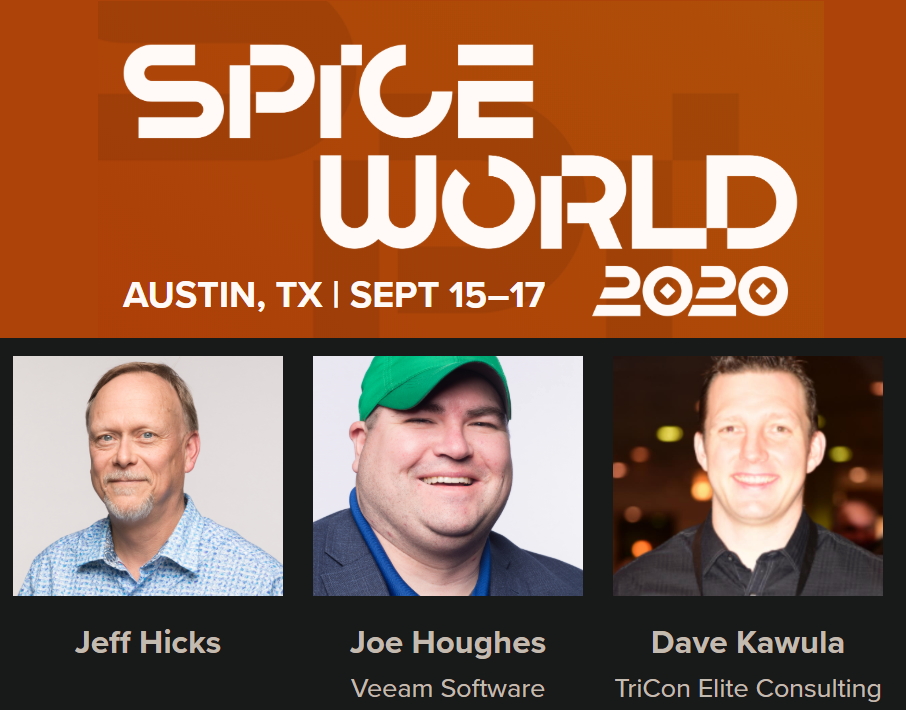
I got selected to present at SpiceWorld (hosted by Spiceworks) in September 2019, for a session titled “From Scripting to Toolmaking: Taking the Next Step With Powershell”. I also got to attend a great PowerShell workshop and a few sessions by one of my PowerShell heroes, Jeff Hicks, and to chat with another Microsoft MVP and Veeam Vanguard, Dave Kuwala. It was pretty cool to see my picture next to these two on the speakers page.
So naturally, on this page, you’ll find a little bit more about me. The FullStackGeek blog is a personal blog owned and maintained by Joseph Houghes, who is just an all-around native Austin geek.
I’m currently a Solutions Architect for Veeam Software, focused on automation & integration. Throughout the last 18 years of my career, I have worked in the enterprise, financial, healthcare, vendor partner and SMB verticals. My primary focus for the day job and most of what I’ll post about will be VMware and virtualization-centric.
I have had requests to make my slides from the newest “Automate Yourself Out of a Backup Job” presentation available, so I am finally getting them posted at this link for public download.
The attachment is only a PDF export of the presentation slides themselves.
I will be working on recording my demo videos with some added voiceover, so they will be available outside of the recorded breakout sessions posted on the VeeamON site.
DISCLAIMER: I was invited to join in for a few vendor presentations during Tech Field Day Extra at VMworld US 2018, but I was provided any compensation, only stickers/swag. No one requires that I write this blog post, nor did they request it. I have written my honest opinion about this vendor, product and the presentation made during Tech Field Day Extra at VMworld US 2018.
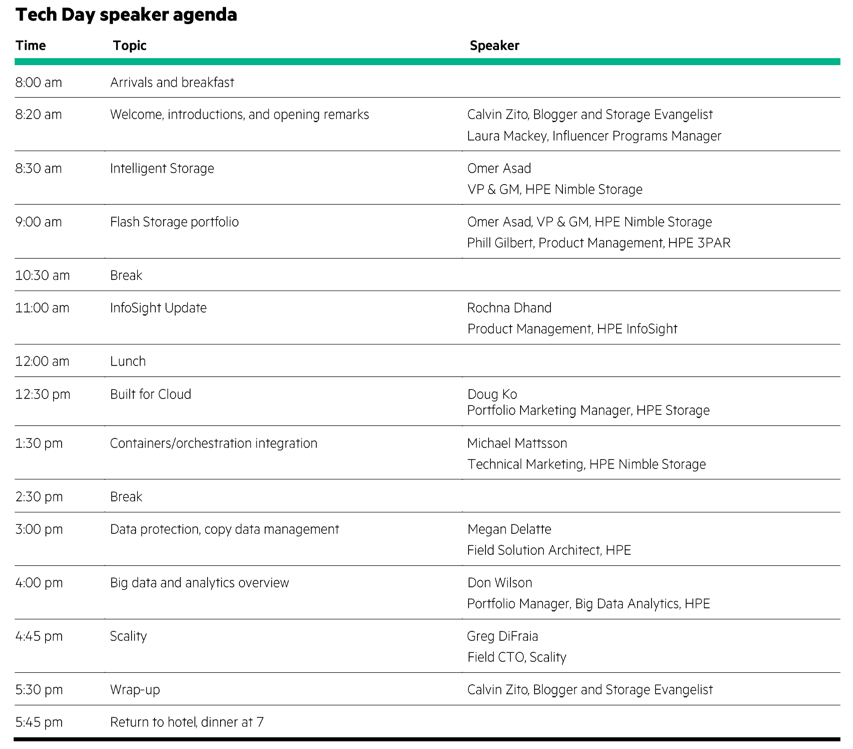
HPE has invited a great group of bloggers and influencers to join for HPE Storage Tech Day.
We are here to get a deep dive on all things storage within the HPE ecosystem, including all of the topics seen here:
You can find out more by watching the livestream, by keeping an eye here for blog posts as a follow-up, or by checking content from anyone within this great list of bloggers:
DISCLAIMER: I was invited to join in for a few vendor presentations during Tech Field Day Extra at VMworld US 2018, but I was not compensated in any way, I only grabbed some stickers/swag during this event hosted by GestaltIT and the Tech Field Day organization. No one requires that I write this blog post, nor did they request it. I have written my honest opinion about this vendor, product and the presentation made during Tech Field Day Extra at VMworld US 2018.
DISCLAIMER: I was invited to join in for a few vendor presentations during Tech Field Day Extra at VMworld US 2018, but I was not compensated in any way, I only grabbed some stickers/swag during this event hosted by GestaltIT and the Tech Field Day organization. No one requires that I write this blog post, nor did they request it. I have written my honest opinion about this vendor, product and the presentation made during Tech Field Day Extra at VMworld US 2018.
After too long of a hiatus, I am out in Silicon Valley this week for the honor of being a first-time delegate for Tech Field Day, specifically at the Storage Field Day 17 event. I’ve still got posts coming from TFDx at VMworld 2018.
This is the event specific page where you can find out more about Storage Field Day 17.
Here is where you can learn more about the awesomeness that is the ecosystem of Tech Field Day.
I just wanted to post this up in case it helps someone else out.
Short recap:
Starting yesterday, when our VBR server was inadvertently rebooted and finished applying some patches that were outstanding for many weeks (don’t get me started on the fiasco of a background story), we started getting multiple failures and error messages. I only caught this while doing a job reconfiguration and trying to map a cloned job to an existing backup chain, which was failing with an error of “Unable to perform data sovereignty check…". The displayed size on disk listed under the Backup Repository selection of the Storage screen in the Backup Job wizard displayed a helpful “Failed” text.
Whew, that title is a mouthful. This post will cover the installation and configuration of the Pure Storage plugin for Veeam Backup & Recovery, but we’ll incorporate some background first.
One of the most significant enhancements released with Veeam 9.5U3 is one from which most users have not seen direct improvement — until now. The specific enhancement that I am referring to is the Universal Storage API, which is the framework that storage vendors can leverage to integrate their storage arrays to allow for Veeam to offload snapshots for backup & recovery operations to the array, rather than relying on VMware snapshots.
We are testing out two new ExaGrid 40000E appliances. These will be new initial target repositories for backups from Veeam Backup & Recovery. This is a prime opportunity to get out another article about the install and initialization of the ExaGrid hardware. I intend to follow with a post about the benefits of the Veeam integration.
ExaGrid is an exceptional idea for their layout with the distinct partitions of a “landing zone” and “retention zone”. The landing zone is intended to host a full backup set. The post-backup deduplication and compression can then take place and be placed into the retention zone. This second zone is the location for longer-term archival of the de-duped and compressed data.
Early this year, there were talks of Cisco acquiring Turbonomic. A few months back this became a partnership to release Cisco Workload Optimization Manager (CWOM). This is one of the newest products included in the Cisco ONE Enterprise Cloud Suite.
Cisco Workload Optimization Manager is now in its 1.1.3 release. Starting with this release, you can target UCS Director as an orchestration target. I would love to leverage this, I now need to get UCS Director back into the environment).
Howdy, this is Joe Houghes. I’d like to introduce myself some in my first real post before I try and speak about technical content. This has been a big year of change for me with regards to my career, personal life, and social presence. As such, I want to share some reflection. This relates to my own experience as someone new to sharing knowledge with others.
I’m a run of the mill 35-year-old out of shape IT geek who is a native of Austin, Texas. I am also an imposter, I face that recognition daily, and I’m completely OK with this realization. I’ve heard a lot of discussion in the last few months around “imposter syndrome”. I’ve also come to a pretty simple conclusion myself which I try to embrace: It doesn’t matter.
We recently upgraded a few of our UCS domains from 3.1(1h) and 3.1(2b) up to 3.2(1d) and we had issues with a few IO modules hanging for up to 2 hours with trying to activate the firmware.
The backup version was updated with no issues, but then the activation stalled through anywhere from 16 to 30 tries before failing.
We decided to leave most of the faulted IOMs alone to see what they would do, but after 2 hours we decided to attempt a reset of one IO module, and that just made it angry…
Howdy y’all, this is Joe. I recently got accepted into the vExpert program for 2017 (second half) mostly based on internal and vendor community contributions.
It’s now time to become a bit more social and share what I can with the wider community.
I’m starting off with adding VMware content about the VMworld 2017 experience. Along with that I’ll be sharing experiences a UCS, PowerShell and VEEAM, and we’ll see where things go.